Comparing two versions of a text by hand is slow, tedious, and easy to get wrong. You scroll up and down, squint at near-identical paragraphs, and try to remember which line changed where. A single misplaced comma or a quietly deleted sentence can disappear into the noise, and the longer the text gets, the harder it becomes to trust your own eyes.
Developers reviewing two snippets of code, writers working through revisions, legal professionals checking contract redlines, and students comparing draft essays all run into the same problem: they need a clear, visual way to see exactly what changed between two versions of a text.
That is exactly what a text diff checker is for. With Toolivoo’s Text Diff Checker, you can paste two texts side by side and instantly see every addition, deletion, and edit highlighted right in your browser — no signup, no uploads, and no software to install.
What Is a Text Diff Checker?
A text diff checker is a tool that takes two pieces of text and shows you exactly how they differ. Instead of reading both versions line by line, you get a visual breakdown of what was added, removed, or changed between the two.
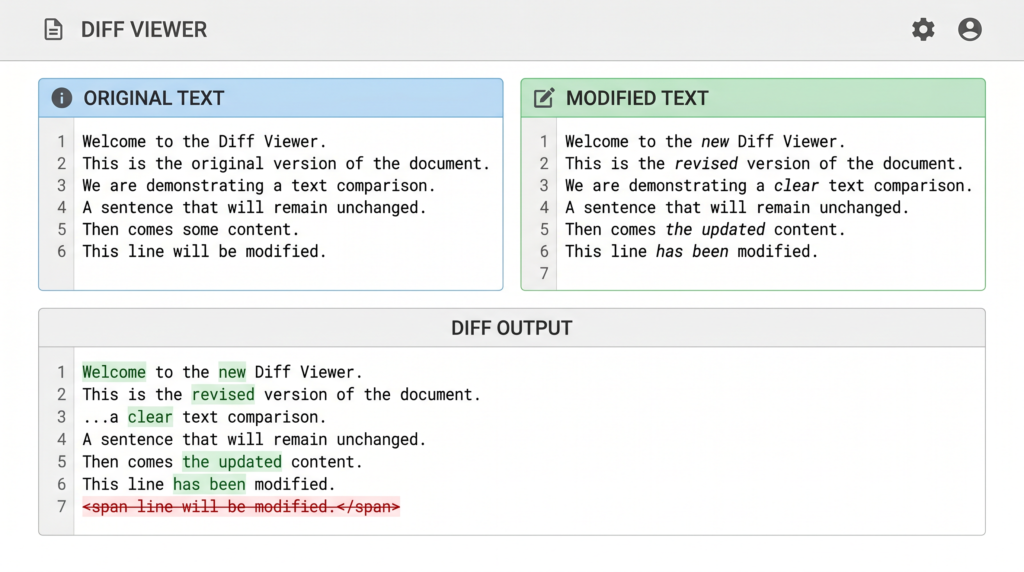
Most diff checkers display the two texts side by side, with color-coded highlights — typically green for additions, red for deletions, and sometimes yellow or another shade for modified sections. The goal is simple: make changes obvious at a glance so you can review them in seconds instead of minutes.
Toolivoo’s Text Diff Checker follows this same approach. You paste your original text on one side, the new version on the other, and the differences are highlighted instantly in the browser.
How Text Comparison Works (LCS)
Behind almost every text diff tool is a classic computer science problem: the Longest Common Subsequence (LCS). The idea is to find the longest sequence of characters, words, or lines that appears in both texts in the same order, even if other content sits between them.
Once the tool knows what the two texts have in common, it can work out the rest by elimination:
- Anything in the original but missing from the new version is marked as a deletion.
- Anything new that wasn’t in the original is marked as an addition.
- Anything that appears in both, in the same order, is treated as unchanged.
This is the same core idea used by tools like git diff, diff on Linux, and the comparison views inside code editors. The math is more involved than it looks, but the result is intuitive: a clean, color-coded view of what actually changed between two texts.
Who Uses Text Diff Tools?
Text diff checkers are used across very different fields, but the underlying need is always the same: people want to compare two texts quickly and trust the result. Here are the most common groups.
Developers
Developers live inside diffs. Code reviews, pull requests, merge conflicts, and refactors all rely on being able to see exactly what changed between two versions of a file. Tools like git diff are built into daily workflows.
But not every comparison belongs in a Git repository. Sometimes you just want to compare two snippets pasted from chat, two configuration files, or two versions of an SQL query — quick, one-off checks where firing up git diff would be overkill. For those quick checks, Toolivoo’s Text Diff Checker gives you a clean, browser-based diff in seconds.
Writers and Editors
Writers and editors deal with constant revisions: drafts, feedback rounds, and final polish passes. When a draft comes back from an editor or collaborator, it’s often unclear which sentences were rewritten and which were left alone.
A text diff checker makes those changes obvious. Pasting the old draft on one side and the new version on the other surfaces every tweak — a tightened sentence, a deleted paragraph, a swapped word — without re-reading the whole document.
Legal and Compliance
In legal and compliance work, every word matters. Contracts, policies, and regulatory documents go through multiple rounds of edits, and missing a single change can have real consequences.
Comparing two versions of a contract by hand is risky. A diff tool gives lawyers, paralegals, and compliance teams a faster, more reliable way to spot inserted clauses, removed obligations, or reworded definitions before signing off.
Students and Academics
Students and academics use text comparison when working through essay drafts, thesis revisions, or feedback from supervisors. Seeing exactly what changed between two versions makes it easier to learn from edits and track progress over time.
It also pairs well with other writing tools. For example, after running a comparison, you can paste the final version into Toolivoo’s Word Counter to check word count, character count, and reading time against assignment limits.
How to Use Toolivoo’s Text Diff Checker
Toolivoo’s Text Diff Checker is designed to be self-explanatory. You can compare two texts in a few steps:
- Open the Text Diff Checker on Toolivoo.
- Paste your original text into the left input box.
- Paste the updated text into the right input box.
- Click the compare button to run the diff.
- Review the highlighted output: additions, deletions, and changed sections are color-coded so you can scan them at a glance.
Like all tools on Toolivoo, it runs entirely in your browser with no tracking, no paywall, and no login.
Text Diff vs Version Control
It’s worth being clear about what a text diff checker is — and what it isn’t. A diff checker compares two pieces of text at a single moment in time. You give it version A and version B, and it tells you what’s different.
A version control system like Git does much more than that. It stores the full history of a project, tracks who changed what and when, supports branches, merges, and lets you roll back to any previous state. Diffs are just one feature inside a much larger system.
For projects with many contributors and a long history, version control is the right answer. For everyday, ad-hoc comparisons — a contract revision, two paragraphs from a chat, two configs from different servers — a simple online text diff checker is faster and easier.
Frequently Asked Questions
What does it mean to compare two texts?
Comparing two texts means looking at two versions of the same content side by side and identifying what was added, removed, or changed. A text diff checker automates this by highlighting the differences visually instead of relying on you to spot them manually.
Is Toolivoo’s Text Diff Checker free?
Yes. The Text Diff Checker is completely free, with no signup, no paywall, and no usage limits for normal use. You can compare as many texts as you need directly in your browser.
Do I need to install anything to compare text online?
No. Toolivoo’s Text Diff Checker runs entirely in your browser. There’s nothing to download or install — just open the page, paste your two texts, and view the differences.
Is my text safe when I use the tool?
The comparison happens in your browser, so your text isn’t stored on Toolivoo or shared with third parties. That makes the tool a reasonable choice for sensitive content like contracts or unpublished writing, although you should always follow your organization’s policies for confidential material.
What’s the difference between a text diff checker and Git?
A text diff checker compares two specific pieces of text and shows you the differences. Git is a full version control system that tracks the entire history of a project, including branches, commits, and authors. Diff is just one feature inside Git, and a standalone diff tool is often faster for quick, one-off checks.
Can I compare long documents?
Yes. The Text Diff Checker is designed to handle anything from a few sentences to longer documents like articles, essays, or contracts. Very large inputs may take a moment longer to process, but the comparison still runs in your browser.